



impossible to
possible

LucyBrain Switzerland ○ AI Daily
Google Stitch Complete Guide 2026: Vibe Design, Voice Canvas & Free AI UI Tool (Copy-Paste Prompts + vs Figma)

Master AI-native UI design through Google Stitch - the completely free platform enabling anyone to create production-ready interfaces from natural language prompts ("design a meditation app landing page that feels calm and minimal") generating multiple high-fidelity design directions in seconds versus traditional wireframe-first workflows requiring hours of manual component assembly, with March 18, 2026 update introducing voice canvas (speak design changes live), vibe design concept (start with business objectives and desired feelings rather than technical specifications), and direct pipeline to production code through Antigravity/AI Studio eliminating designer-developer handoff friction costing teams 20-40% of product velocity.
This complete Stitch guide reveals platform capabilities based on March 2026 redesign showing infinite AI-native canvas replacing flat artboards (drop images, text, code anywhere as context), design agent understanding entire project history enabling multi-direction exploration simultaneously, DESIGN.md format exporting/importing design systems across tools (extract from any URL, apply to other projects), instant prototype generation ("Stitch" screens together, click "Play" for interactive flows), and MCP server integration connecting Stitch to Claude Code, Cursor, Gemini CLI creating seamless design-to-development workflow impossible in traditional tools. Developed through hands-on testing plus analysis of official Google Labs announcement, real designer reactions, and competitive positioning versus Figma/Adobe showing Stitch excels at rapid exploration (minutes rather than days for dozens of variations) while traditional tools maintain advantages in pixel-perfect refinement, team collaboration depth, and production design system management making practical workflow "explore in Stitch, refine in Figma, build in Antigravity" for most teams.
What you'll learn:
✓ What vibe design means (intent-based creation vs component assembly)
✓ How to use voice canvas (speak directly to AI agent)
✓ Copy-paste prompts (10+ examples for apps, landing pages, dashboards)
✓ Free access (stitch.withgoogle.com, no payment required)
✓ DESIGN.md system (export/import design rules)
✓ Stitch vs Figma comparison (strengths, weaknesses, when to use which)
✓ Integration with code tools (MCP server + Claude/Cursor/Antigravity)
What is Google Stitch?
Definition: Free AI-powered UI design platform from Google Labs that generates high-fidelity web and mobile interfaces from text prompts, voice descriptions, images, or sketches - with clean HTML/CSS code you can actually use.
Released: Google I/O 2025 (initial launch as rebrand of acquired Galileo AI) Major update: March 18, 2026 (complete redesign with vibe design)
Access: stitch.withgoogle.com (free, requires Google account, 18+ age) Availability: Every region where Gemini is available
What Changed in March 2026 Update:
Before (2025):
Text-to-UI generator
Flat canvas
Single-direction generation
Manual editing limited
After (March 18, 2026):
AI-native infinite canvas
Voice canvas (speak to AI)
Vibe design (intent-based creation)
Multi-direction exploration
Direct manual editing
DESIGN.md export/import
MCP server integration
React app export
Market impact: Figma stock fell after Google Labs updates Stitch design tool announcement, signaling serious competitive threat to established players.
The "Vibe Design" Revolution
Traditional workflow (Figma, Sketch, Adobe XD):
Start with wireframes
Define components precisely
Manually arrange layouts
Iterate pixel by pixel
Handoff to developers
Time: Days to weeks
Vibe design workflow (Stitch):
Describe business objective OR desired feeling OR inspiration
AI generates multiple design directions instantly
Explore dozens of variations quickly
Refine chosen direction
Export to production code
Time: Minutes to hours
What "Vibe Design" Actually Means:
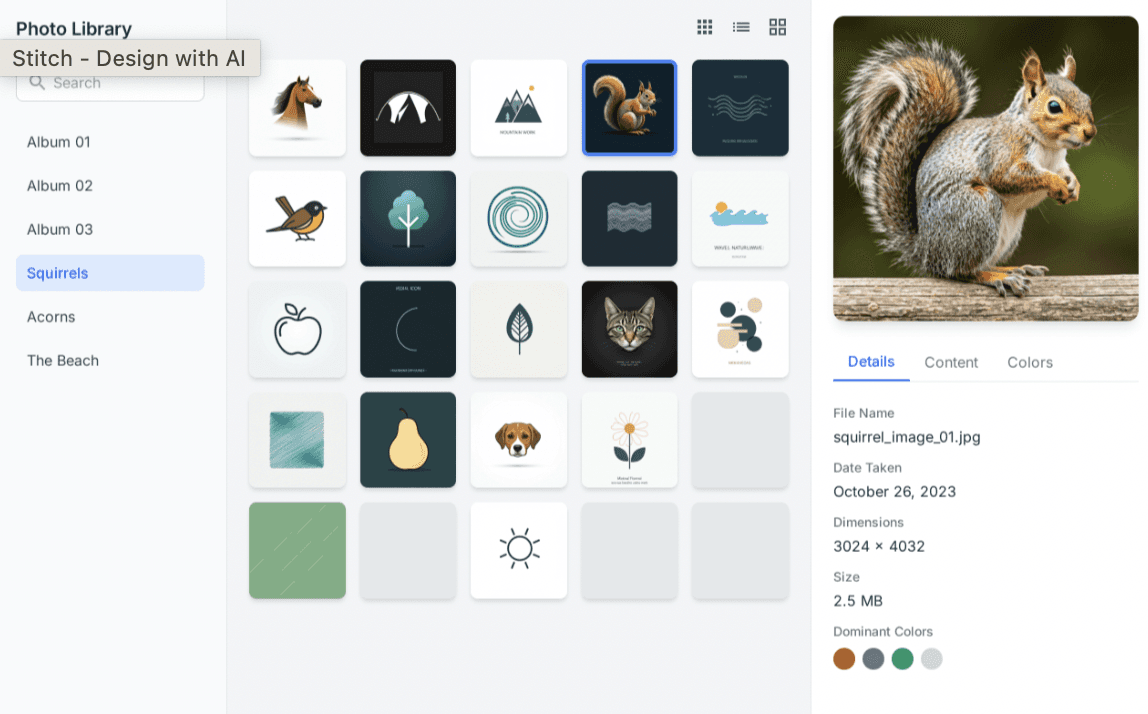
Vibe Design replaces the traditional wireframe-first workflow. Instead of specifying exact components, you describe a business objective, a desired user feeling, or a design inspiration.
Instead of saying: ❌ "Create a login screen with email input, password input, submit button, and forgot password link"
You say: ✅ "Design a welcoming login experience that feels secure and trustworthy, inspired by Stripe and Notion"
Result: AI generates 3-5 complete design variations matching that vibe, exploring different visual languages while maintaining the desired emotional tone.
Why This Matters:
Traditional design:
Designer needs technical knowledge (components, grids, spacing)
Non-designers can't prototype ideas
Requires learning Figma/Adobe tools (steep curve)
Vibe design:
Anyone can describe desired outcome
Non-designers create high-fidelity mockups
No tool learning required (natural language)
Practical impact: Founders, product managers, and developers can now visualize ideas before involving designers, accelerating early-stage exploration.
Voice Canvas: Speak to Your Design
The breakthrough feature in March 2026 update:
You can speak directly to your canvas. The agent can give you real-time design critiques, design a new landing page by interviewing you, and make real-time updates — like "give me three different menu options," or "show me this screen in different color palettes" — as you speak.
How Voice Canvas Works:
Interactive conversation:
All done through voice, in real-time, watching updates happen live.
Voice Commands That Work:
Exploration:
"Give me three different menu options"
"Show me this screen in different color palettes"
"Create variations with different typography styles"
"What if we made this more playful?"
Critique:
"What do you think about this layout?"
"How can I make this more user-friendly?"
"Is this accessible for mobile users?"
"What's missing from this design?"
Refinement:
"Make the headline bigger and bolder"
"Add more whitespace around the cards"
"Change the call-to-action button to green"
"Move the testimonials section higher"
Contextual creation:
"Design a new landing page" [Agent interviews you with clarifying questions]
"Create a dashboard for tracking workouts"
"Build a checkout flow for an e-commerce site"
The New Infinite Canvas
What's different from traditional design tools:
Traditional (Figma):
Fixed artboards (375×812 for iPhone, 1440×900 for desktop)
Rigid frames and constraints
Organized layer panels
Stitch Infinite Canvas:
Truly infinite workspace
No predefined artboards
Drop anything anywhere (images, text, code, sketches)
AI uses everything as context
What You Can Drop on Canvas:
Images:
Screenshots for inspiration ("make this, but for a meditation app")
Brand assets (logos, photos)
UI examples you like
Text:
Business objectives ("increase email signups by 30%")
User pain points ("users struggle to find settings")
Feature requirements
Code:
Existing HTML/CSS snippets
React components
Design tokens
Sketches:
Hand-drawn wireframes
Napkin scribbles
Rough layout ideas
AI reasoning: The design agent analyzes ALL context on canvas, understanding relationships between elements and generating designs that incorporate everything.
Design Agent & Agent Manager
Design Agent:
What it does: A new design agent tracks the entire history of a project, allowing it to reason through different versions.
Practical meaning:
Remembers every iteration
Understands design evolution
Suggests logical next screens (based on current screens)
Maps user journeys automatically
Example:
Agent Manager:
Google also introduced an Agent Manager, which allows designers to explore multiple ideas in parallel while staying organized.
What this means:
Run multiple design directions simultaneously
Branch creative explorations without losing original
Compare radically different approaches side-by-side
Choose best direction after seeing all options
Traditional problem: Exploring direction A means abandoning direction B Stitch solution: Explore A, B, C, D simultaneously in separate agent threads
DESIGN.md: Portable Design Systems
The problem Stitch solves:
Traditional design systems locked in specific tools - Figma components don't transfer to Adobe XD, Sketch libraries don't export to code tools.
Stitch's solution: DESIGN.md
We have broadened our design system toolkit to enable creation with deeper context. You can easily extract a design system from any URL, or use the new DESIGN.md — an agent-friendly markdown file — to export or import your design rules to or from other design and coding tools.
How DESIGN.md Works:
Extract from any URL:
Apply to your project:
Share across tools:
Export from Stitch → Import to Claude Code (via MCP)
Export from Figma → Import to Stitch
Export to Antigravity (Google's code tool)
Benefit: Design systems become portable, not tool-locked
Instant Prototyping
Traditional prototyping (Figma):
Design each screen manually
Click "Prototype" mode
Manually link screens with connections
Define interactions per hotspot
Click "Present" to test
Time: 30-60 minutes for 5-screen flow
Stitch prototyping:
Design screens (or AI generates them)
Click "Stitch" (button literally called this)
AI auto-links screens logically
Click "Play" to test
Time: Seconds
How Auto-Stitching Works:
You can "Stitch" screens together in seconds and simply click "Play" to quickly preview your interactive app flow. Stitch can automatically generate logical next screens based on the click, mapping out user journeys effortlessly.
Example:
Testing: Click "Play" → Interact like real app → See full journey
Copy-Paste Prompts for Stitch
Prompt Template Structure:
Prompt 1: SaaS Landing Page
Prompt 2: Mobile App Onboarding
Prompt 3: E-commerce Product Page
Prompt 4: Dashboard Interface
Prompt 5: Login/Signup Flow
Prompt 6: Blog/Content Platform
Prompt 7: Settings Interface
Prompt 8: Mobile App Home Screen
Prompt 9: Checkout Flow
Prompt 10: Admin Panel
Stitch vs Figma: The Real Comparison
Where Stitch Wins:
Speed of exploration:
Stitch: Minutes for dozens of variations
Figma: Hours for handful of iterations
Winner: Stitch (10-20x faster)
Barrier to entry:
Stitch: Natural language (anyone can use)
Figma: Requires tool mastery (weeks to learn)
Winner: Stitch (accessibility)
Cost:
Stitch: Free (completely)
Figma: $12-45/month per editor
Winner: Stitch ($0 vs $144-540/year)
AI integration:
Stitch: AI-native (built around AI from ground up)
Figma: AI features bolted on
Winner: Stitch (native AI workflow)
Voice control:
Stitch: Full voice canvas
Figma: No voice features
Winner: Stitch (unique capability)
Code export:
Stitch: Clean HTML/CSS, React app export
Figma: Requires plugins, messy code
Winner: Stitch (usable code)
Where Figma Wins:
Pixel-perfect control:
Figma: Precise positioning, constraints, auto-layout
Stitch: AI-generated (less manual control)
Winner: Figma (precision)
Team collaboration:
Figma: Real-time multi-user, comments, version history (mature)
Stitch: Basic collaboration (new platform)
Winner: Figma (established features)
Design systems:
Figma: Components, variants, robust libraries
Stitch: DESIGN.md (new approach, less proven)
Winner: Figma (maturity)
Plugins/extensions:
Figma: 1,000+ plugins
Stitch: MCP server (new, limited ecosystem)
Winner: Figma (ecosystem)
Production refinement:
Figma: Polish final pixel-perfect designs
Stitch: Best for exploration, not final polish
Winner: Figma (finishing work)
Enterprise features:
Figma: SSO, admin controls, compliance
Stitch: Early stage (Google Labs experiment)
Winner: Figma (enterprise-ready)
The Practical Workflow (2026):
Don't choose one - use both strategically:
Explore in Stitch (Day 1-2)
Generate 20-30 design directions quickly
Use vibe design and voice canvas
Find promising approaches
Refine in Figma (Day 3-5)
Import chosen Stitch direction
Add design system components
Pixel-perfect polish
Team collaboration and feedback
Build in Antigravity/AI Studio (Day 6+)
Export from Stitch or Figma
Generate production code
Deploy
Time savings: 40-60% vs traditional all-Figma workflow
Integration with Code Tools (MCP Server)
The bridge between design and development:
Stitch can also act as a bridge to all of the other tools in your team's workflow. Using the recently released Stitch MCP server and SDK, you can leverage Stitch's capabilities via skills and tools. Or export your designs to developer tools like AI Studio and Antigravity.
What MCP Integration Means:
Supported tools:
Claude Code: AI coding in terminal
Cursor: AI-native code editor
Antigravity: Google's code generation tool
Gemini CLI: Command-line AI assistant
AI Studio: Google's AI development platform
Workflow:
DESIGN.md + MCP Workflow:
No designer-developer handoff friction!
Who Should Use Stitch?
Perfect for:
Founders & entrepreneurs:
Visualize product ideas before hiring designers
Create investor pitch decks with real UI mockups
Test concepts with users quickly
Product managers:
Prototype features without design bottleneck
Communicate vision to stakeholders visually
Explore alternatives before committing resources
Developers:
Mock up UIs without Figma skills
Generate code-ready designs
Bridge design-development gap
Designers (early exploration):
Rapidly explore dozens of directions
Break creative blocks with AI suggestions
Speed up ideation phase 10-20x
Non-designers building side projects:
Create professional-looking interfaces
No design tool learning curve
Free (no budget needed)
Not ideal for:
❌ Production design systems (Figma better for components/variants) ❌ Pixel-perfect brand work (less manual control than Figma) ❌ Complex enterprise team workflows (Figma more mature) ❌ Print design (Stitch is UI/digital only) ❌ Illustration/graphic design (different use case)
Getting Started with Stitch
Access: stitch.withgoogle.com
Requirements:
Google account (free)
18+ years old
Region where Gemini available
First steps:
Go to stitch.withgoogle.com
Sign in with Google account
Try your first prompt:
Watch AI generate multiple variations
Use voice: Click microphone icon, speak refinements
Export: Download as HTML/CSS or export to code tools
Learning curve: 5-10 minutes to first usable result
Limitations & Considerations
Current limitations (March 2026):
Brand consistency:
AI may not perfectly match brand guidelines without explicit DESIGN.md
Requires iteration to nail specific brand feel
Accessibility:
AI-generated designs may not meet WCAG standards
Manual review needed for accessibility compliance
Complex interactions:
Best for standard UI patterns
Custom animations/interactions need refinement
Team features:
Early stage collaboration (vs mature Figma features)
Version control less robust
Platform stability:
Google Labs = experimental (could be discontinued)
Not guaranteed like Figma enterprise SLA
Strategic consideration: Use Stitch for exploration, refine in stable production tools
The Bigger Picture: AI-Native Design
What Stitch represents:
Not just a tool - a paradigm shift in how interfaces get created.
Traditional (2010-2025):
Design = manual craft
Tools = digital versions of physical tools (rulers, layers)
Designers = sole creators
AI-Native (2026+):
Design = collaborative conversation with AI
Tools = intelligence amplifiers
Designers = creative directors
The shift: From "I draw rectangles and position text" To "I describe desired outcomes and AI explores options"
Stitch is the first mainstream tool embodying this shift.
Lucy+ Stitch Mastery
For Lucy+ members, we reveal our complete Stitch workflow system:
✓ 100+ copy-paste prompts (every UI type, app category) ✓ Voice command library (exact phrases that work best) ✓ DESIGN.md templates (pre-built design systems) ✓ Stitch → Figma workflows (hybrid approach strategies) ✓ MCP integration guides (Stitch to Claude Code pipelines) ✓ Advanced techniques (multi-agent exploration, style transfer)
Read Also
Make Money with AI 2026: 15 Proven Ways (ChatGPT, Replit, Midjourney)
Build a SaaS App with Replit 2026: Complete Guide
Top 3 AI Image Tools 2026: Nano Banana vs Midjourney vs ChatGPT
FAQ
Is Google Stitch actually free or is there a paid tier?
Completely free with zero payment tiers as of March 2026 - Stitch remains Google Labs experimental project accessible at stitch.withgoogle.com requiring only free Google account (18+ age) with no feature limitations, usage caps, or premium subscriptions unlike Figma's $12-45/month pricing, though experimental status means Google could theoretically introduce paid tiers future or discontinue project entirely following historical pattern with Google Labs products. The strategic positioning suggests Google offering Stitch free to disrupt Adobe/Figma dominance in $10B+ design tool market where established players charge hundreds annually per user, with Google monetizing through broader ecosystem (driving Gemini adoption, strengthening Google Cloud developer relationships, positioning against Microsoft-owned GitHub ecosystem) rather than direct Stitch subscriptions. Practical reality shows full feature access March 2026 including voice canvas, DESIGN.md export, MCP server integration, React app generation, and unlimited project creation without payment barriers, making Stitch unbeatable value proposition for individual designers, startups, and non-designers needing professional UI mockups. The experimental caveat requires acknowledging Google Labs history discontinuing products (Google Wave, Google+, dozens others) meaning teams building production workflows shouldn't depend solely on Stitch without migration contingency plans, though current free access makes it zero-risk exploration tool worth using while available. Strategic recommendation: leverage Stitch aggressively for rapid exploration and ideation (its core strength) while maintaining Figma/Adobe subscriptions for production design systems and team collaboration (their core strengths) until Stitch demonstrates multi-year stability proving long-term viability beyond experimental phase.
Can Stitch actually replace Figma for professional design work?
No for production design systems and pixel-perfect refinement, yes for rapid exploration and early-stage ideation - Stitch excels at generating dozens of design directions in minutes through vibe design and voice canvas enabling 10-20x faster exploration than manual Figma workflows, while Figma maintains advantages in precise component systems, mature team collaboration, robust plugin ecosystem, and enterprise features making practical 2026 workflow "explore in Stitch, refine in Figma, build in code tools" rather than complete Figma replacement. The capability comparison reveals Stitch revolutionary for specific phases: early concept exploration where founders/PMs visualize product ideas without design skills (Figma requires weeks learning tool mastery), rapid prototyping where voice commands like "show me three different menu layouts" generate instant variations (Figma demands manual component creation), and design-to-code workflows where MCP server exports clean React/HTML to Claude Code or Antigravity (Figma's code export requires plugins producing messy output). However Figma dominates critical production needs including design system depth (components with variants, nested instances, auto-layout constraints enabling scalable systems), team collaboration maturity (real-time multi-user editing, robust version history, commenting infrastructure refined over decade), pixel-perfect control (precise positioning, Boolean operations, advanced effects impossible through AI generation), and enterprise requirements (SSO, admin controls, compliance certifications). Real-world designer workflows demonstrate complementary usage: Stitch generates 20-30 exploration directions in first 1-2 days revealing promising approaches impossible discovering through manual iteration, chosen direction imports to Figma for 3-5 days refinement applying design system components and pixel-perfect polish, final designs export to production code via traditional developer handoff or emerging MCP pipelines. The cost equation favors hybrid approach: Stitch free eliminates exploration phase tool costs ($144-540/year Figma editor seats), maintaining single Figma subscription for final refinement preserves production quality, total savings 60-80% versus all-Figma workflow while improving exploration breadth 5-10x through AI-native rapid iteration. Strategic reality March 2026: Stitch threatens Figma's market position (evidenced by Figma stock drop after Stitch announcement) by commoditizing early-stage exploration previously requiring expensive design tools, though Figma's moat remains production refinement and enterprise collaboration making complete replacement unlikely short-term while forcing Figma accelerating own AI features defending market share.
What does "vibe design" actually mean in practice?
Vibe design means describing desired emotional outcomes, business objectives, and inspirational references rather than specifying exact UI components - practitioners type prompts like "design meditation app landing page feeling calm and minimal inspired by Headspace and Apple Health" letting AI generate multiple complete design directions matching that vibe, versus traditional wireframe-first approach manually assembling buttons, inputs, and layouts requiring technical design knowledge. The practical workflow transformation shows traditional designers starting Figma projects by creating rectangles representing sections, positioning text layers precisely, defining component architecture, and assembling layouts through dozens of manual decisions consuming hours before seeing complete designs - vibe design users instead describe intent ("landing page converting free trial signups feeling modern and trustworthy like Linear"), AI generates 3-5 fully-realized high-fidelity options within seconds, designers evaluate emotional resonance and strategic fit rather than technical execution. The conceptual shift mirrors "vibe coding" trend where developers describe desired software behavior through natural language (Claude Code, Cursor) rather than writing syntax line-by-line, extending AI-native workflows from code generation to interface design through same principle: human provides creative direction and strategic judgment, AI handles technical execution and rapid iteration. Example comparison demonstrates difference: traditional designer creating SaaS dashboard manually chooses navigation placement (sidebar vs top nav), defines card grid systems, selects color palettes from brand guidelines, positions charts precisely, spending 4-8 hours producing single high-fidelity mockup - vibe designer types "dashboard for social media managers feeling data-rich but clean, inspired by Buffer and Google Analytics emphasizing actionable insights", receives 4 complete dashboard designs in varied visual languages within 2 minutes, refines chosen direction through voice commands ("make charts more prominent, reduce sidebar width") watching real-time updates. The limitation acknowledges vibe design sacrifices pixel-perfect control and systematic component architecture for exploration speed and accessibility, making it ideal for early-stage ideation, founder prototyping, and PM mockups while requiring traditional tools (Figma) for production refinement - strategic workflow combines both approaches using vibe design generating broad exploration impossible through manual methods, then importing promising directions into traditional tools for precision finishing maintaining design system integrity and brand consistency standards.
How do I integrate Stitch with Claude Code, Cursor, and other development tools?
Use Stitch's MCP (Model Context Protocol) server enabling direct export of designs and design systems to AI coding assistants like Claude Code, Cursor, Gemini CLI, and Antigravity - developers install Stitch MCP server, export DESIGN.md file from Stitch containing design rules and components, AI coding tools import DESIGN.md automatically applying design system to generated code ensuring pixel-perfect brand consistency without manual developer translation. The technical implementation workflow shows developers visiting Stitch MCP server GitHub repository (linked from official Stitch documentation), installing via npm or preferred package manager, configuring MCP connection in Claude Code/Cursor/Gemini CLI settings pointing to Stitch instance, then accessing Stitch designs directly within coding environment through MCP protocol commands. Practical usage demonstrates power: designer creates dashboard interface in Stitch using company design system, exports as DESIGN.md markdown file capturing color tokens, typography scale, spacing system, component patterns, developer opens Claude Code terminal typing "build user settings page using imported Stitch design system", Claude generates React components matching exact Stitch aesthetic including proper color variables, font families, spacing units, and component styling without designer explaining technical specifications. The DESIGN.md portability extends beyond coding tools enabling design system extraction from any URL (input stripe.com, Stitch analyzes and captures Stripe's design language as exportable file), application across multiple Stitch projects (reuse design system avoiding reinventing wheels), and sharing between team members ensuring consistency. Advanced workflows combine multiple integrations: extract design system from inspirational website via Stitch → export as DESIGN.md → import to Cursor → build new feature matching aesthetic → preview in Antigravity → deploy production code, compressing traditional weeks-long design-development cycles into hours through automated design-code translation. The strategic advantage eliminates traditional designer-developer handoff friction where developers misinterpret designs, implement incorrect spacing, choose wrong colors, requiring multiple iteration rounds - MCP integration provides machine-readable design specifications AI coding tools follow precisely. Limitation acknowledges MCP ecosystem nascent (Stitch MCP server released recently) meaning fewer tutorials, community examples, and integration guides versus mature Figma plugins, though Google's investment in MCP protocol and compatibility with major coding assistants (Claude Code, Cursor explicitly mentioned in Stitch announcement) signals growing adoption trajectory making March 2026 excellent entry point for early adopters establishing AI-native design-development workflows before mainstream competition.
Will Google discontinue Stitch like other Google Labs projects?
Unknown but risks exist - Google Labs history shows dozens of discontinued products (Wave, Reader, Plus, Inbox, etc.) creating valid concerns about Stitch long-term viability, though March 2026 major update investment plus competitive positioning against Adobe/Figma plus integration with Google's broader AI strategy (Gemini, Antigravity, AI Studio pipeline) suggests higher commitment than typical experiments making Stitch more likely surviving but requiring teams maintaining backup plans. The historical pattern reveals Google Labs launches experimental products testing market response, discontinuing those failing gaining traction or fitting strategic priorities - successful examples like Gmail and Maps graduating from Labs to core products while failures disappearing sometimes abruptly leaving users stranded. Stitch indicators suggesting potential longevity include: significant engineering investment evidenced by March 2026 complete redesign (voice canvas, infinite canvas, MCP server representing substantial development), competitive market positioning directly challenging Adobe/Figma dominance in lucrative $10B+ design tools market where Google traditionally competes (vs niche experiments unlikely scaling), ecosystem integration throughout Google's AI stack (Gemini powers Stitch, exports to Antigravity/AI Studio, MCP connects to Google Cloud developer tools) indicating strategic importance beyond isolated experiment, and market timing capitalizing on AI-native design wave where first-mover advantage matters establishing workflows before competitors. Counterarguments acknowledge Google's track record disappointing users with product shutdowns, Labs designation explicitly signaling experimental status without guarantees, free pricing model lacking obvious revenue stream raising sustainability questions (though strategic value competing against Adobe/Microsoft potentially justifies investment), and Google's historical tendency pivoting priorities leaving products unsupported. The practical risk mitigation strategy treats Stitch as acceleration tool for exploration phases (rapid ideation, concept visualization, early prototyping) where even temporary availability delivers value, while maintaining traditional tool subscriptions (Figma, Adobe XD) for production design systems ensuring continuity if Stitch discontinues, and exporting Stitch work to standard formats (HTML/CSS, DESIGN.md files, screenshots) preventing lock-in enabling migration to alternative tools if necessary. Strategic recommendation March 2026: leverage Stitch aggressively given zero cost and revolutionary capabilities for use cases matching its strengths (vibe design exploration, voice-driven iteration, code integration), simultaneously maintaining production tool redundancy acknowledging discontinuation possibility, with upside of potential long-term survival if Stitch succeeds disrupting design tool market justifying early adoption establishing competitive advantage before mainstream discovery.
Conclusion
Google Stitch's March 18, 2026 redesign introduces "vibe design" - the AI-native workflow replacing wireframe-first approaches with intent-based creation where designers describe desired feelings, business objectives, and inspiration references generating multiple high-fidelity UI directions in seconds versus hours required for manual component assembly, complemented by voice canvas enabling spoken design commands ("show me three different color palettes") updating interfaces in real-time and DESIGN.md portable design systems extracting rules from any URL applying across projects and tools eliminating repetitive setup work.
The strategic positioning targets both professional designers accelerating early exploration phases 10-20x through rapid AI-generated variations and non-designers (founders, product managers, developers) creating professional mockups without tool mastery traditionally requiring weeks learning Figma, challenging Adobe/Figma dominance in $10B+ design tools market through completely free access eliminating $144-540/year per-seat costs while integrating throughout Google's AI ecosystem (Gemini-powered generation, Antigravity code export, MCP server connecting Claude Code/Cursor) creating design-to-production pipelines impossible in isolated traditional tools.
The practical workflow combines Stitch's exploration strengths (vibe design generating dozens of directions, voice commands enabling conversational iteration, instant prototyping testing user journeys) with traditional tools' refinement advantages (Figma's pixel-perfect control, component systems, team collaboration) through "explore in Stitch, refine in Figma, build in code tools" approach compressing weeks into days while maintaining production quality - though Google Labs experimental status requires contingency planning acknowledging potential discontinuation risk despite March 2026 investment suggesting higher commitment than typical experiments.
Master vibe design workflows before competitors discover Stitch's acceleration capabilities. The free access and AI-native approach eliminate barriers to professional UI creation.
Start today at stitch.withgoogle.com using copy-paste prompts from this guide to generate your first high-fidelity interface in minutes.
www.topfreeprompts.com
Access 80,000+ professional prompts including complete Stitch vibe design templates for every UI type. Master AI-native design workflows transforming ideas into interfaces in minutes rather than days.
Newest Prompt Articles

More Prompt Articles Like This

























Thinking
Explore